Not-so-quick start
Apologies for the clickbait.
The pdtable package allows working with StarTable tables as pandas
dataframes while consistently keeping track of StarTable-specific
metadata such as table destinations and column units.
This is implemented by providing two interfaces to the same backing
object: - TableDataFrame is derived from pandas.DataFrame. It
carries the data and is the interface of choice for interacting with the
data using the pandas API, with all the convenience that this entails.
It also carries StarTable metadata, but in a less accessible way. -
Table is a stateless façade for a backing TableDataFrame object.
Table is the interface of choice for convenient access to
StarTable-specific metadata such as column units, and table destinations
and origin. Some data manipulation is also possible in the Table
interface, though this functionality is limited.
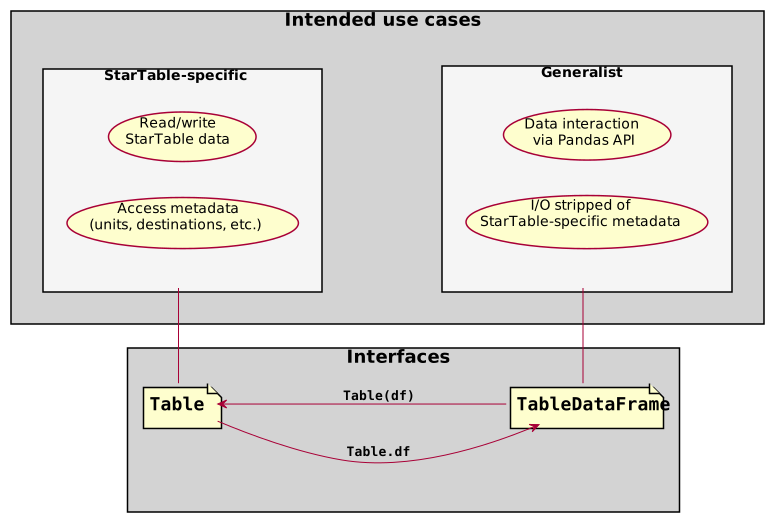
Table interfaces
StarTable data can be read from, and written to, CSV files and Excel workbooks. In its simplest usage, the pdtable.io API can be illustrated as:
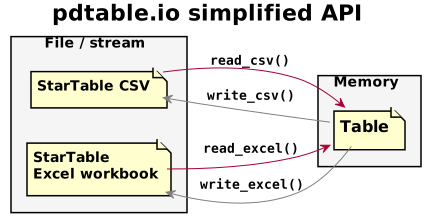
For a more detailed diagram of the pdtable.io API, see pdtable.io API.
This page shows code that demonstrates usage. See the pdtable
docstring for a discussion of the implementation.
Idea
The central idea is that as much as possible of the table information is
stored as a pandas dataframe, and that the remaining information is
stored as a ComplementaryTableInfo object attached to the dataframe
as registered metadata. Further, access to the full table datastructure
is provided through a facade object (of class Table). Table
objects have no state (except the underlying decorated dataframe) and
are intended to be created when needed and discarded afterwards:
tdf = make_table_dataframe(...)
unit_height = Table(tdf).height.unit
Advantages of this approach are that:
Code can be written for (and tested with) pandas dataframes and still operate on
TableDataFrameobjects. This frees client code from necessarily being coupled to the startable project. A first layer of client code can read and manipulate StarTable data, and then pass it on as a (TableDataFrame-flavoured)pandas.DataFrameto a further layer having no knowledge ofpdtable.The access methods of pandas
DataFrames,Series, etc. are available for use by consumer code via theTableDataFrameinterface. This both saves the work of re-implementing similar access methods on a StarTable-specific object, and likely allows better performance and documentation.
The Table aspect
The table aspect presents the table with a focus on StarTable metadata. Data manipulation functions exist, and more are easily added – but focus is on metadata.
from pdtable import frame
from pdtable.proxy import Table
t = Table(name="mytable")

# Add columns explicitly...
t.add_column("places", ["home", "work", "beach", "unicornland"], "text")

# ...or via item access
t["distance"] = [0, 1, 2, 42]

# Modify column metadata through column proxy objets:
t["distance"].unit = "km"  # (oops I had forgotten to set distance unit!)

# Table renders as annotated dataframe
t
**mytable
all
  places [text]  distance [km]
0          home              0
1          work              1
2         beach              2
3   unicornland             42
t.column_names
['places', 'distance']
# Each column has associated metadata object that can be manipulated:
t["places"]
Column(name='places', unit='text', values=<PandasArray>
['home', 'work', 'beach', 'unicornland']
Length: 4, dtype: object)
t.units
['text', 'km']
str(t)
'**mytable\nall\n places [text] distance [km]\n0 home 0\n1 work 1\n2 beach 2\n3 unicornland 42'
t.metadata
TableMetadata(name='mytable', destinations={'all'}, operation='Created', parents=[], origin='')
# Creating table from pandas dataframe:
t2 = Table(pd.DataFrame({"c": [1, 2, 3], "d": [4, 5, 6]}), name="table2", units=["m", "kg"])
t2
**table2
all
   c [m]  d [kg]
0      1       4
1      2       5
2      3       6
The TableDataFrame aspect
Both the table contents and metadata displayed and manipulated throught
the Table-class is stored as a TableDataFrame object, which is a
normal pandas dataframe with two modifications:
It has a
_table_datafield registered as a metadata field, so that pandas will include it in copy operations, etc.It will preserve column and table metadata for some pandas operations, and fall back to returning a vanilla
pandas.DataFrameif this is not possible/implemented.
# After getting a reference to the TableDataFrame backing Table t, it is safe to delete t:
df = t.df
del t
# Just construct a new Table facade, and everything is back in place.
Table(df)
**mytable
all
  places [text]  distance [km]
0          home              0
1          work              1
2         beach              2
3   unicornland             42
# Interacting with table metadata form  without the Table proxy is slightly verbose
df2 = frame.make_table_dataframe(
    pd.DataFrame({"c": [1, 2, 3], "d": [4, 5, 6]}), name="table2", units=["m", "kg"]
)
# Example: combining columns from multiple tables
df_combinded = pd.concat([df, df2], sort=False, axis=1)
Table(df_combinded)
**mytable
all
  places [text]  distance [km]  c [m]  d [kg]
0          home              0    1.0     4.0
1          work              1    2.0     5.0
2         beach              2    3.0     6.0
3   unicornland             42    NaN     NaN
Fundamental issues with the facade approach
The key problem with not integrating more tightly with the dataframe
datastructure is that some operations will not trigger __finalize__
and thus have to be deciphered based on the dataframe and metadata
states.
One example of this is column names:
# Make a table and get its backing df
tab = Table(pd.DataFrame({"a": [1, 2, 3], "b": [4, 5, 6]}), name="foo", units=["m", "kg"])
df = tab.df
# Edit df column names
df.columns = ["a_new", "b_new"]

# This edit doesn't propagate to the hidden metadata!
col_names_before_access = list(df._table_data.columns.keys())
print(f"Metadata columns before update triggered by access:\n{col_names_before_access}\n")
assert col_names_before_access == ["a", "b"]  # Still the old column names

# ... until the facade is built and the metadata is accessed.
_ = str(Table(df))  # access it
col_names_after_access = list(df._table_data.columns.keys())
print(f"Metadata columns after update:\n{col_names_after_access}\n")
assert col_names_after_access == ["a_new", "b_new"]  # Now they've updated
Metadata columns before update triggered by access:
['a', 'b']

Metadata columns after update:
['a_new', 'b_new']